NeuNew Version 1.3 · 15 neue VorlagenVersion 1.3 · 15 new templates

Deine Fotos.
Dein Kunstwerk.
Your photos.
Your masterpiece.

Gridium macht aus deinen Fotos in Sekunden eine durchdachte Collage – für Instagram, Story, WhatsApp oder den Ausdruck. Vorlage antippen, Fotos wählen, fertig. Gridium turns your photos into a thoughtful collage in seconds – for Instagram, stories, WhatsApp or print. Tap a template, choose your photos, done.

Laden im App Store Download on the App Store

Android demnächstAndroid coming soon

  • 43 Vorlagentemplates
  • 32 Formateformats
  • Kein Konto · kein Abo · keine WerbungNo account · no subscription · no ads
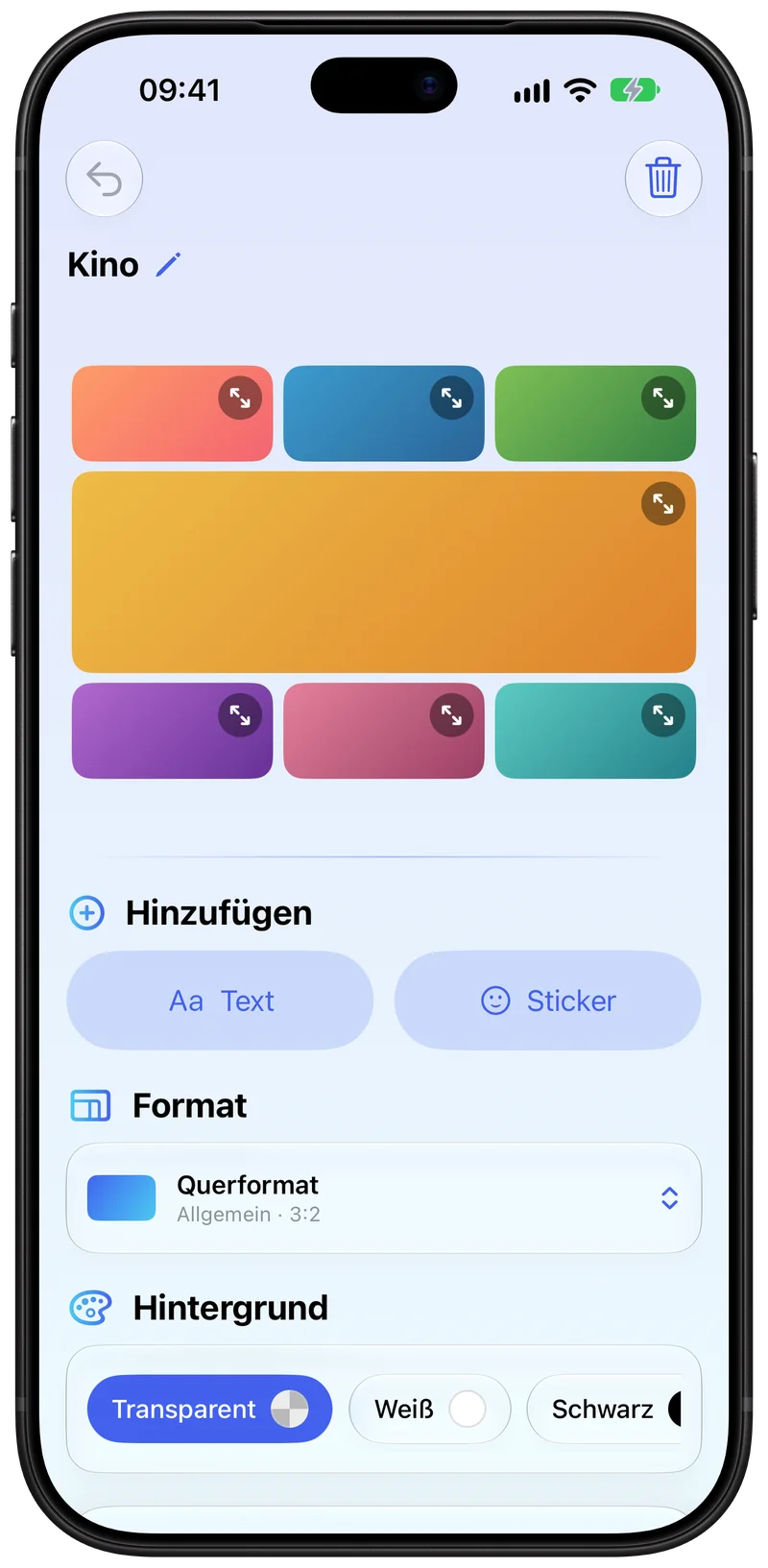
Gridium-Editor auf dem iPhone: eine Kino-Collage aus sieben Fotos mit Werkzeugen für Text, Sticker, Format und Hintergrund.
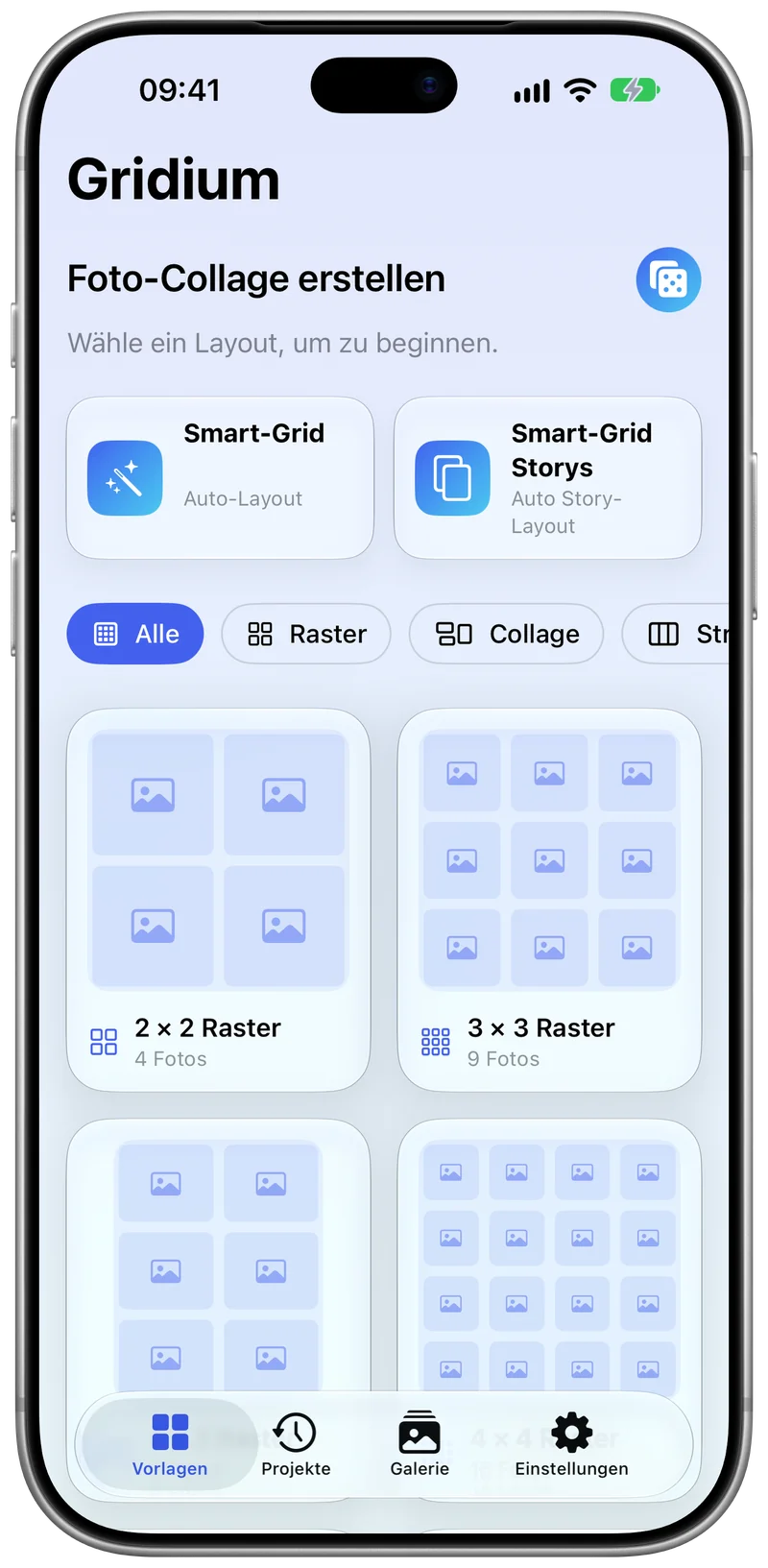
Vorlagenauswahl von Gridium auf dem iPhone mit Smart-Grid, Smart-Grid Storys, Filtern sowie 2 × 2 und 3 × 3 Raster.

Vorlagen in BewegungTemplates in motion

Ein Layout. So viele Ideen. One layout. So many ideas.

Vom klassischen 2 × 2 über Bento, Magazin und Photo Dump bis zur Story-Fotokabine: Deine Fotos ordnen sich in Sekunden neu. Tipp eine Vorlage an – oder würfle. From a classic 2 × 2 to bento, magazine and photo dump all the way to the story photo booth: your photos rearrange in seconds. Tap a template – or roll the dice.

2 × 2 Raster2 × 2 Grid 4 Fotos · Quadrat 1:14 photos · Square 1:1

VorlagenTemplates

43 Vorlagen. Für jedes Motiv.43 templates. For every shot.

Raster von 2 × 2 bis 4 × 4, Collagen, Streifen und 10 eigene Story-Layouts im Format 9:16 – für 1 bis 16 Fotos. Genau so, wie sie in der App stehen.Grids from 2 × 2 to 4 × 4, collages, strips and 10 dedicated 9:16 story layouts – for 1 to 16 photos. Exactly as they appear in the app.

  • 2 × 2 Raster2 × 2 Grid

    4 Fotos · Raster4 photos · Grid

  • 3 × 3 Raster3 × 3 Grid

    9 Fotos · Raster9 photos · Grid

  • 2 × 3 Raster2 × 3 Grid

    6 Fotos · Raster6 photos · Grid

  • 4 × 4 Raster4 × 4 Grid

    16 Fotos · Raster16 photos · Grid

  • Vertikale StreifenVertical Strips

    3 Fotos · Streifen3 photos · Strips

  • Horizontale StreifenHorizontal Strips

    3 Fotos · Story3 photos · Story

  • Hauptbild linksFeature Left

    4 Fotos · Collage4 photos · Collage

  • Hauptbild obenFeature Top

    3 Fotos · Collage3 photos · Collage

  • Eins über ZweiOne over Two

    3 Fotos · Collage3 photos · Collage

  • Zwei über EinsTwo over One

    3 Fotos · Collage3 photos · Collage

  • MosaikMosaic

    5 Fotos · Collage5 photos · Collage

  • EinzelfotoSingle Photo

    1 Foto · Collage1 photo · Collage

  • NebeneinanderSide by Side

    2 Fotos · Streifen2 photos · Strips

  • ÜbereinanderStacked

    2 Fotos · Streifen2 photos · Strips

  • 3 × 2 Raster3 × 2 Grid

    6 Fotos · Raster6 photos · Grid

  • 4 × 2 Raster4 × 2 Grid

    8 Fotos · Raster8 photos · Grid

  • 3 × 4 Raster3 × 4 Grid

    12 Fotos · Raster12 photos · Grid

  • Hauptbild rechtsFeature Right

    4 Fotos · Collage4 photos · Collage

  • Hauptbild untenFeature Bottom

    3 Fotos · Collage3 photos · Collage

  • Groß oben + DreiBig Top + Three

    4 Fotos · Collage4 photos · Collage

  • Zwei links, eins rechtsTwo Left, One Right

    3 Fotos · Collage3 photos · Collage

  • Halb + RasterHalf + Grid

    5 Fotos · Collage5 photos · Collage

    NeuNew
  • Bento 6Bento 6

    6 Fotos · Collage6 photos · Collage

    NeuNew
  • MagazinMagazine

    6 Fotos · Collage6 photos · Collage

    NeuNew
  • Vorher / NachherBefore / After

    2 Fotos · Streifen2 photos · Strips

    NeuNew
  • Vorher / Nachher + DetailsBefore / After + Details

    4 Fotos · Collage4 photos · Collage

    NeuNew
  • Photo DumpPhoto Dump

    7 Fotos · Collage7 photos · Collage

    NeuNew
  • Bento 7Bento 7

    7 Fotos · Collage7 photos · Collage

    NeuNew
  • Outfit des TagesOutfit of the Day

    7 Fotos · Collage7 photos · Collage

    NeuNew
  • RezeptRecipe

    7 Fotos · Collage7 photos · Collage

    NeuNew
  • MoodboardMoodboard

    6 Fotos · Collage6 photos · Collage

    NeuNew
  • Reise-PanoramaTravel Panorama

    5 Fotos · Collage5 photos · Collage

    NeuNew
  • TriptychonTriptych

    5 Fotos · Collage5 photos · Collage

    NeuNew
  • KinoCinema

    7 Fotos · Collage7 photos · Collage

    NeuNew
  • Story DuoStory Duo

    2 Fotos · Story2 photos · Story

  • Story Duo 50/50Story Duo 50/50

    2 Fotos · Story2 photos · Story

  • Story-Raster 2 × 3Story Grid 2 × 3

    6 Fotos · Story6 photos · Story

  • Story Hauptbild obenStory Feature Top

    3 Fotos · Story3 photos · Story

  • Story Hauptbild untenStory Feature Bottom

    3 Fotos · Story3 photos · Story

  • Story MosaikStory Mosaic

    5 Fotos · Story5 photos · Story

  • Story-Raster 2 × 4Story Grid 2 × 4

    8 Fotos · Story8 photos · Story

  • Story FotokabineStory Photo Booth

    4 Fotos · Story4 photos · Story

    NeuNew
  • Story SandwichStory Sandwich

    5 Fotos · Story5 photos · Story

    NeuNew

FunktionenFeatures

Dein Moment. Dein Design.Your moment. Your design.

Alles, was eine gute Collage braucht – ohne dich mit Optionen zu überladen.Everything a good collage needs – without burying you in options.

Smart-Grid wählt für dichSmart Grid picks for you

Wähle einfach deine Fotos – Gridium sucht die passende Vorlage für die Anzahl aus. Mit eigener Story-Variante. Oder lass dich per Würfel überraschen.Just pick your photos – Gridium chooses the right template for how many you picked. With its own story variant. Or roll the dice for a surprise.

Photo Dump

Kachel für KachelTile by tile

Jedes Foto lässt sich zoomen, verschieben, ersetzen oder zurücksetzen. Kacheln tauschst du per Drag & Drop.Zoom, move, replace or reset every photo. Swap tiles with drag & drop.

Dein Look, stufenlosYour look, fine-tuned

Hintergrund transparent, weiß, schwarz, als Verlauf oder in deiner Wunschfarbe. Abstand, Ecken, Bildecken, Außenrand und Rahmen stellst du stufenlos ein. Probier’s aus:Transparent, white, black, gradient or any color background. Fine-tune spacing, collage and photo corners, outer margin and frame. Try it:

HintergrundBackground

Text & StickerText & stickers

Beschrifte deine Collage in 8 Schriftarten und jeder Farbe – mit Pipette direkt aus dem Foto. Dazu Emoji- und Symbol-Sticker, frei drehbar und skalierbar.Caption your collage in 8 typefaces and any color – with an eyedropper that samples straight from your photo. Plus emoji and symbol stickers you can rotate and scale freely.

  • RundlichRounded
  • Serif
  • Modern
  • GeometrischGeometric
  • SchreibmaschineTypewriter
  • HandschriftHandwritten
  • KalligrafieCalligraphy
  • KreidetafelChalkboard

32 Formate32 formats

Quadrat, Hoch- und Querformat, Story und Panorama sowie passende Größen für Instagram, Facebook und TikTok. Für den Ausdruck: DIN A3 bis A6.Square, portrait, landscape, story and panorama, plus the right sizes for Instagram, Facebook and TikTok. For print: A3 to A6.

AllgemeinGeneral 10

  • 1:1
  • 4:5
  • 3:4
  • 2:3
  • 9:16
  • 4:3
  • 3:2
  • 16:9
  • 2:1
  • 21:9
  • Instagram 6Post, Hoch, Quer, Story, Reel, ProfilbildPost, portrait, landscape, story, reel, profile
  • Facebook 7Beitrag, Hoch, Quer, Story, Reel, Titelbild, ProfilbildPost, portrait, landscape, story, reel, cover, profile
  • TikTok 4Video, Foto hoch, Foto quadratisch, ProfilbildVideo, portrait photo, square photo, profile
  • PapierPaper 5DIN A3, A4, A4 quer, A5, A6A3, A4, A4 landscape, A5, A6

Zusammen:Total: 10 + 6 + 7 + 4 + 5 = 32

8 Farbthemen & echtes Schwarz8 color themes & true black

Die App gibt es in 8 Farbthemen – mit echtem Schwarz im Dark Mode für OLED-Displays.The app comes in 8 color themes – with true black in dark mode for OLED displays.

Farbthema ansehenPreview a color theme

Projekte sichern sich selbstProjects that save themselves

Angefangene Collagen werden automatisch gesichert – weiterbearbeiten, umbenennen, anheften, duplizieren. Projekte liegen als eigene .gridium-Dateien in der Dateien-App und reisen per AirDrop oder iCloud Drive.Collages in progress are saved automatically – resume, rename, pin and duplicate them anytime. Projects are real .gridium files in the Files app you can pass on via AirDrop or iCloud Drive.

Sichern & teilenSave & share

Export als JPEG, PNG, HEIF oder PDF – in hoher Auflösung in deine Fotomediathek, in die Dateien-App oder über das Teilen-Menü an WhatsApp, Nachrichten, Instagram, Signal, Threema und alle anderen Apps. Fertige Collagen sammelt die Galerie.Export as JPEG, PNG, HEIF or PDF – in high resolution to your photo library, to Files, or through the share sheet to WhatsApp, Messages, Instagram, Signal, Threema and every other app. Finished collages live in the gallery.

Für iPhone, iPhone Duo und iPadFor iPhone, iPhone Duo and iPad

Auf dem iPad, dem aufgeklappten iPhone Duo und im Querformat liegen Collage und Werkzeuge nebeneinander.On iPad, the unfolded iPhone Duo and in landscape, the collage and your tools sit side by side.

  • Haptisches FeedbackHaptic feedbackSpürbar bei jedem SchrittFeel every step
  • Deutsch & EnglischEnglish & GermanFolgt deiner SystemspracheFollows your system language

Version 1.3 · 29. September 2026Version 1.3 · September 29, 2026

Neu in 1.3. 15 Vorlagen mehr.New in 1.3. 15 more templates.

  • 15 neue Vorlagen – jetzt 4315 new templates – now 43

    Bento 6 & 7, Magazin, Photo Dump, Moodboard, Outfit des Tages, Rezept, Vorher/Nachher (auch mit Details), Reise-Panorama, Triptychon, Kino, Halb + Raster, Story Fotokabine und Story Sandwich.Bento 6 & 7, Magazine, Photo Dump, Moodboard, Outfit of the Day, Recipe, Before/After (also with details), Travel Panorama, Triptych, Cinema, Half + Grid, Story Photo Booth and Story Sandwich.

  • Smart-Grid für 7 FotosSmart Grid for 7 photos

    Bei 7 Fotos wählt Smart-Grid jetzt „Photo Dump“, bei 4 Story-Fotos die „Story Fotokabine“.With 7 photos, Smart Grid now picks “Photo Dump”; with 4 story photos, the “Story Photo Booth”.

  • Umbenennen im EditorRename in the editor

    Per Stift oder Doppeltipp. Der Projektname bleibt beim Scrollen über der Collage stehen.With the pencil or a double tap. The project name stays pinned above the collage while you scroll.

  • iPhone Duo & QuerformatiPhone Duo & landscape

    Collage und Werkzeuge nebeneinander, Einstellungen in zwei Spalten.Collage and tools side by side, settings in two columns.

  • Angepasst an iOS 27Updated for iOS 27

    Buttons folgen jetzt der Rundung deines Displays.Buttons now follow the curve of your display.

Screenshots

Einmal quer durch die App.A quick tour of the app.

Screenshots show the German interface – the app is fully available in English, too.

PrivatsphärePrivacy

Deine Fotos bleiben bei dir.Your photos stay yours.

Gridium verarbeitet alles auf deinem Gerät. Nichts wird hochgeladen, nichts ausgewertet.Gridium does everything on your device. Nothing is uploaded, nothing is analyzed.

  • Kein KontoNo account
  • Kein UploadNo upload
  • Kein TrackingNo tracking
  • Keine WerbungNo ads
  • Kein AboNo subscription

Und diese Website? Keine Cookies, keine Tracker, keine externen Schriften oder Skripte – deshalb auch kein Cookie-Banner. Datenschutzerklärung And this website? No cookies, no trackers, no external fonts or scripts – which is why there’s no cookie banner either. Privacy policy

Bereit für dein
erstes Kunstwerk?
Ready for your
first masterpiece?

Gridium für iPhone und iPad. Ohne Abo, ohne Werbung.Gridium for iPhone and iPad. No subscription, no ads.

Laden im App Store Download on the App Store

Erfordert iOS 26 oder neuer · Deutsch & Englisch · Android-Version in ArbeitRequires iOS 26 or later · English & German · Android version in the works